New Switching webinar platforms shouldn't be painful. We'll do the heavy lifting  ·  See how

Webinar.net compared to the platforms you're evaluating.

Side-by-side breakdowns of Webinar.net against ON24, GoToWebinar, and Zoom Webinars. Production time, pricing, white-label, integrations, audience cap, and pipeline yield. Updated for 2026.

★★★★★4.7/5 on G2 · 90 reviews
4,000+ branded webinars produced monthly
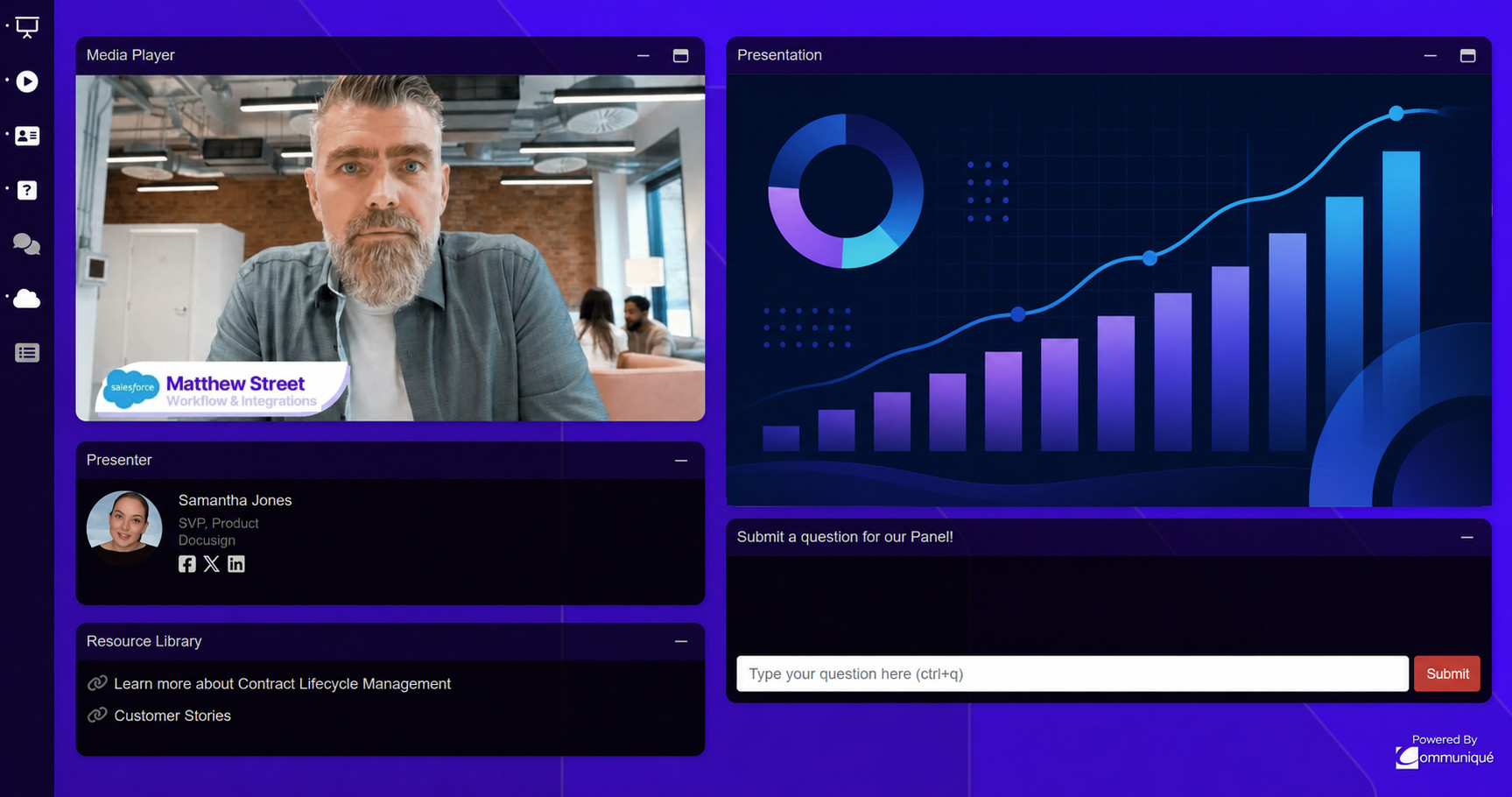
Branded Webinar.net audience console with video, presentation, resources, and Q&A
Trusted since 2001. 4,000+ branded webinars produced every month for leading B2B publishers and enterprise marketing teams.
Amazon Microsoft Deloitte Salesforce Pfizer Sony BlackRock Citi Thermo Fisher Scientific CNBC S&P Global Bio-Rad Levi's Adweek Questex
Quick definitions

Each platform, defined in one paragraph.

Clean, citable definitions of every webinar platform in this comparison.

What is Webinar.net?

Webinar.net is a modern webinar platform built for B2B marketing teams driving pipeline. It produces broadcast-grade live and on-demand events with dynamic console layouts, full white-label branding, native CRM integrations, and AI Content Studio.

What is ON24?

ON24 is an enterprise webinar platform founded in 1998, focused on B2B marketing engagement. Contracts are annual and start in the low five figures, scaling into six figures. Events typically take 2 to 3 hours to produce and often involve a dedicated producer for complex programs.

What is GoToWebinar?

GoToWebinar is a general-purpose webinar tool from GoTo. Used widely for internal training and basic marketing events. Most plans cap audience size at 3,000 attendees and use a static slide-and-chat layout.

What is Zoom Webinars?

Zoom Webinars is the webinar product from Zoom, extending the meeting platform to support registered audiences. Events run on zoom.us with Zoom branding visible.

At a glance

All four platforms, side by side.

The short version. For the full treatment on any one comparison, see the dedicated page below.

  BEST OVERALLWebinar.net EnterpriseON24 General-purposeGoToWebinar Meetings toolZoom Webinars
Audience experienceFull customization. Add and arrange movable, resizable components such as video, slides, Q&A, polls, resources, surveys, and other content inside a branded attendee console.Similar audience console customization, but no dynamic layoutsStatic experience. No branding or customizationStatic experience. No branding or customization
Dynamic console layouts: change the on-screen experience throughout the webinarYesNoNoNo
Multi-session eventsYesYesNoNo
Continuing education and certificationYesYesNoNo
Built-in production studioYes. Built-in multi-camera switching studioOptional add-on. No built-in video switchingNoNo
Multilingual supportText captions, AI voice translation, multi-language slides, registration, and emailsText captions, AI voice translation, registration, and emailsText captionsText captions
Registration and landing pagesFull white-label. Custom domain, registration, console, emailsPartial. Underlying experience recognizable as ON24Limited. GoToWebinar branding visible to audienceZoom branding throughout: emails, join page, console, recording
Built-in recording editingYes. Trim anywhere, replace slides, adjust slide timeing, replace media, chagne the layout.NoNoNo
Storage and retentionFree, unlimited hosting. No storage fees or per-recording chargesTied to active subscription term1-year retention. Unlimited storage on Pro/Enterprise only30-day default retention (configurable on paid plans)
Replay experienceFully interactive like live events. Reporting continues tracking view time and engagement.Fully interactive like live events. Reporting continues tracking view time and engagement.Static video file. No engagement or view time tracked.Static video file. No engagement or view time tracked.
AI content repurposingYesYesNoNo
Native CRM integrationsSFDC, Marketo, HubSpot, Pardot, Eloqua, OmedaSFDC, Marketo, Eloqua, HubSpotSFDC, HubSpot, MarketoSFDC, HubSpot (some via Zapier)
Attendees per event100,000+~10,0003,000100 to 10,000

Comparison reflects publicly available information as of May 2026. Competitor features and pricing vary by plan tier and contract.

Detailed comparisons

The full breakdown on each.

Capability tables, pricing math, FAQ, and the four reasons marketers switch.

Webinar.net vs

ON24

Same broadcast-grade audience experience. Less admin time per webinar (set up through post event), lower pricing, and more live day studio controls including video switching.

See the comparison
Webinar.net vs

GoToWebinar

Built for marketing yield, not internal meetings. Native CRM integrations, custom branding, dynamic console layouts, and engagement capture that GoToWebinar does not offer.

See the comparison
Webinar.net vs

Zoom Webinars

Custom branding, a better attendee experience, and pipeline-grade analytics your CRM can actually use. Zoom Webinars is a meeting tool repurposed for webinars.

See the comparison
How to evaluate

Six questions that actually matter.

Most webinar platform RFPs ask the wrong questions. Here's what to ask if pipeline is the goal.

1

How long does one event take to produce?

The hidden cost of a webinar platform is your team's time. Minutes versus 2 to 3 hours per event compounds fast across 12 to 30 events a year.

2

Does the audience see your brand, or the platform's?

Custom landing pages, custom emails (including your domain), custom branded audience console. Anything less and you're handing brand authority to a vendor at the conversion moment.

3

Do CRM signals fire in real time?

Native integrations (not Zapier, not CSV exports) into Marketo, HubSpot, Pardot, Salesforce, Eloqua, and Omeda. MQL scoring needs to fire while the audience is still warm.

4

What is the audience experience, actually?

Dynamic console layouts that surface the right content and CTAs at the right moments. Multi-camera switching. Engagement components placed in-line, not buried in a sidebar.

5

What happens to the event after it ends?

The replay should remain interactive — questions, polls, surveys & resource downloads remain active, while viewing time + engagement continue to be captured. AI should auto-generate clips, transcripts, blog drafts & short-form vertical video.

6

How is the pricing structured?

Per-event, per-host subscription, or annual contract? Pricing structure should match how your team actually runs webinars. Host-seat taxes punish teams with shared access.

Answers

Common questions when comparing webinar platforms.

What are the best alternatives to ON24, GoToWebinar, and Zoom Webinars?

Webinar.net is the leading alternative for B2B marketing teams. It combines broadcast-grade audience experience (like ON24), per-event pricing (unlike ON24's annual contracts), no producer requirement, full white-label, dynamic console layouts, native CRM integrations, and AI Content Studio. Pricing starts at $1,950 per managed webcast.

How should I evaluate a webinar platform?

Evaluate webinar platforms on six criteria: production time per event, white-label depth (custom domain and branding), native CRM integrations, audience experience (dynamic console, multi-camera), pricing structure (per-event versus per-host subscription versus annual contract), and downstream content yield.

Is Webinar.net cheaper than ON24, GoToWebinar, or Zoom Webinars?

For most B2B marketing programs, yes. Webinar.net starts at $1,950 per managed webcast with no host-seat tax. ON24 contracts start in the low five figures annually. GoToWebinar is $109 to $499+ per host per month. Zoom Webinars is $79 to $340+ per host per month plus audience tier add-ons. Per qualified lead, Webinar.net typically delivers a lower cost at audience sizes over 500.

Which webinar platform is best for B2B marketing teams?

Webinar.net is purpose-built for B2B marketing teams driving pipeline. ON24 is comparable on audience experience but expensive and slower to produce. GoToWebinar is built for general-purpose webinars and internal training. Zoom Webinars is a meeting tool extended into webinars and lacks marketing-grade branding and console capabilities.

How long does it take to switch webinar platforms?

Most teams launch their first Webinar.net event within two weeks. The Webinar.net team handles migration of historical registration data, branded templates, and integration setup with your existing CRM and marketing automation platform.

Run the comparison on your own numbers.

20 minutes. Zero commitment. We will run a real live event using your content, your branding, and your CRM stack so you can see the production-time and pipeline math.

Get a Live Demo Start a Free Trial
Recognition

Rated #1 in customer satisfaction

G2 Summer 2026 Leader G2 Summer 2026 Best Results G2 Summer 2026 Best Estimated ROI, Mid-Market G2 Summer 2026 Most Implementable G2 Summer 2026 Best Usability, SMB G2 Summer 2026 Best Relationship, SMB